
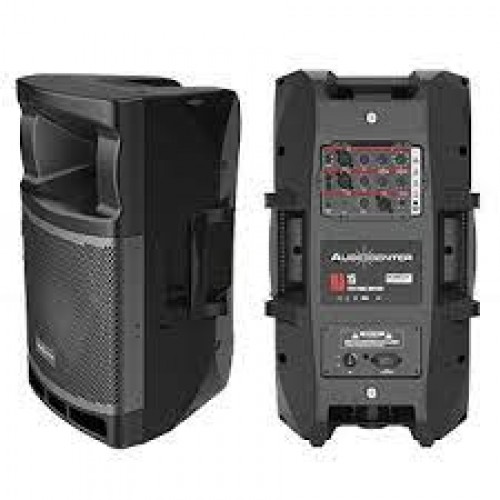
15" Active 2-Way, BraincoreTM DSP 96KHz Sampling / 24bit Precision, Class D Amplification, Mic / Line & Bluetooth Input Source, 3 Band EQ (Bass, Mids & Treble), Audiocenter Loaded, Polypropylene Cabinet with Black Finish, 500W Program, Max SPL (Cal): 133dB
MA series cabinets are moulded and made from a new type of polypropylene composite material. They are one-piece molded, strong and wear-resistant,
and can suppress vibration even under high dynamics.
The cabinet structure has been carefully tested and developed to achieve the ultimate acoustic performance, providing clear, delicate and smooth sound.
CREATED WITH FEATURES OF EXCELLENT SOUND PERFORMANCE, COMPACT SIZE, AND MODERN DESIGN, AND EASY TO USE.
THEY CAN BE USED AS PA SPEAKERS AND AS STAGE MONITORS.
POLE MOUNT WITH A THREE-FEET STAND, OR HANGING INSTALLATION.
1. PROTECT indicator
The indicator is on when the system detects abnormal of the speaker and starts protection mode.
2. LIMITER indicator
The indicator is on when output limiter is activated. If the output voltage of the amplifier exceeds
the maximum value, output limiter will be activated, lower the output signal of the amplifier.
3. SIGNAL indicator
The indicator is on when the input signal is detected.
4. POWER indicator
The indicator is on when speaker is connected to power.
5. FRONT LED DISABLE switch
Switch on and the front panel LED indicator is on (operating mode: blue; standby mode: red);
Switch off when the front panel LED indicator is unneeded.
6. BLUETOOTH indicator
- When the indicator is off, it indicates no connection to any Bluetooth devices
(for example, mobile phone);
- When the light is on,it indicates that the speaker has been successfully connected to Bluetooth
devices (for example, mobile phone);
- When the light is flashing (1 time in 1 sec), it indicates that the speaker is ready for Bluetooth
pairing with a device (for example, mobile phone).
- When the light is flashing (3times in 1 sec), it indicates that the speaker is in Bluetooth
speaker-to-speaker pairing mode (for the first time two speakers work as a pair they
need to match each other).
- Remark: The speaker-to-speaker pairing means two MA speakers can work as a pair
(by Bluetooth) and connect to the same Bluetooth source (for example, mobile phone).
7. BLUETOOTH PAIR pairing button
If you want to connect speaker to a Bluetooth source (for example, a mobile phone), first press
“Bluetooth pair” button for 3 seconds (the indicator flashes 1 time in 1 second), and then choose
“AC-MA”as the Bluetooth source to pair.
If you want to pair two speakers for the first time, press “Bluetooth PAIR” button of both
speakers for 5 seconds (Bluetooth indicator flashes 3 times in 1 second). The two speakers
will be paired automatically.
8. LOW SHELF 100Hz LF control
This is a low shelf filter with 100Hz cut-off frequency. Turn the knob to reduce or boost the low
frequency when signal frequency is lower than 100Hz.
9. EQ parameter equalizer
This is a Peaking Filter, used together with GAIN knob and FREQ knob.
10. FREQ: centre frequency 160Hz, 320Hz, 630Hz, 1KHz, 1.6KHz, 2.5KHz, 4KHz, 6.3KHz, 8KHz
optional. GAIN: reduce or boost the selected central frequency signal.
11. HIGH SHELF 10KHz HF control
This is a High Shelf Filter with 10kHz cut-off frequency. Turn the knob to reduce or boost
the high frequency when signal frequency is higher than 10KHz.
12. GAIN A control
Use GAIN A knob to control gain of input signal from LINE A/MIC. GAIN A can adjust the sensitivity
and thus control the volume of signal sent to the amplifier and then to the speaker.
13. GAIN B control
Use GAIN B knob to control gain of input signal from LINE B. GAIN B can adjust the sensitivity and
thus control the volume of signal sent to the amplifier and then to the speaker.
14. GAIN C/D control
Use GAIN C/D knob to control gain of input signal from BLUETOOTH C/D and AUX. GAIN C/D
can adjust the sensitivity and thus control the volume of signal sent to the amplifier and then
to the speaker.
15. LINE/MIC switch
According to the level of the input signal, set the LINE/MIC switch to LINE or MIC. For low-level
signals (such as microphones), switch to the MIC position (upwards); for high-level signals (such
as electroacoustic instruments and audio equipment), switch to the LINE position (downwards).
Generally, when the microphone is not in use, the switch should be at LINE.
16. INPUTS socket(LINE A/ MIC)
Balanced XLR and PHONE type multi-purpose input socket.
17. INPUTS socket(LINE B)
Balanced XLR and PHONE type multi-purpose input socket.
18. INPUTS socket(AUX)
3.5mm input socket.
18. INPUTS socket(AUX)
3.5mm input socket.
19. OUTPUTS socket(MIX OUT)
Balanced XLR output socket. Balance the mixed output signal (able to mix and integrate the signals
of all channels).
20. LOW CUT 80Hz switch
Set cut-off frequency of the high pass filter at 80Hz, the filter will eliminate the frequency lower than
80Hz. Press the switch and activate the function of filter.
Audiocenter MA15
- Product Code: Audiocenter MA15
- Availability: 2-3 Days
-
R 9,000.00